Instagram Reels with voiceover get 2.5x more engagement than text-overlay Reels. But recording your own voice is awkward, time-consuming, and inconsistent. AI voiceover tools like VoisLabs solve this — generate professional narration in seconds, download the audio, and drop it into your Reel.
Here's exactly how to do it, step by step.
Why AI Voiceover for Instagram Reels?
Most Indian creators face three problems with Reels audio:
- Accent anxiety — you want to sound professional but your spoken English (or Hindi) doesn't match the polished content you're creating
- No recording setup — you don't have a quiet room or a decent mic
- Inconsistency — every take sounds different, and editing 15-second clips shouldn't take an hour
AI voiceover eliminates all three. You type your script, pick a voice, and get studio-quality audio in under 30 seconds. No mic, no retakes, no awkward pauses.
Step-by-Step: Add AI Voice to Instagram Reels
Step 1: Write Your Script
Keep it under 150 words for a 60-second Reel (roughly 2.5 words per second). Front-load the hook — the first 3 seconds decide if people keep watching.
Example hook scripts:
- "This one habit changed my morning routine forever..."
- "Nobody talks about this side of freelancing in India..."
- "Here's why your Instagram engagement dropped this month..."
Step 2: Generate the Voiceover with VoisLabs
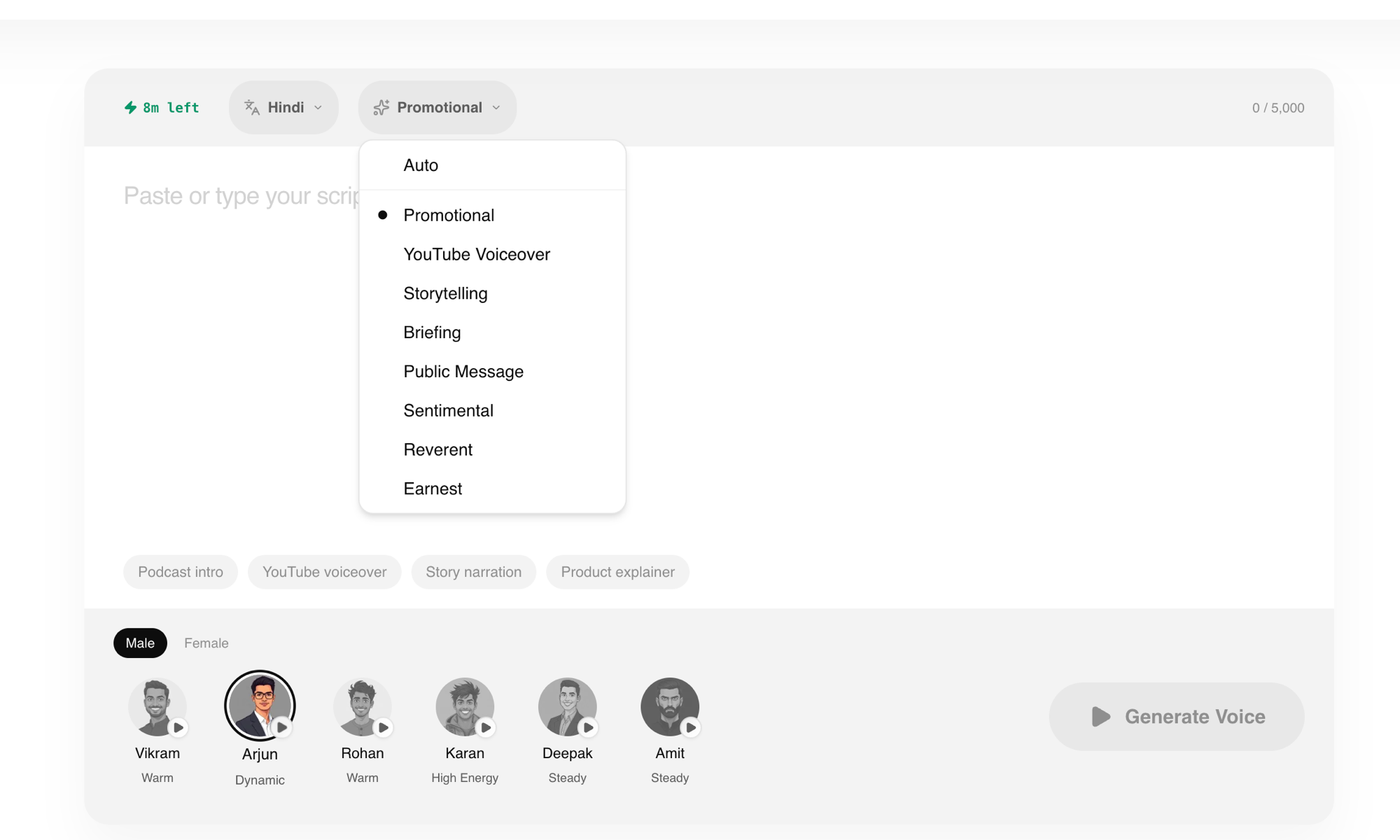
- Go to VoisLabs Voice Studio
- Paste your script
- Choose your language — Hindi, Tamil, Telugu, English, or any of the 7 supported Indian languages
- Pick a voice preset — Reels Voiceover preset is optimized for short-form content
- Hit Generate — your audio is ready in seconds
- Download the MP3
Step 3: Add the Audio to Your Reel
On iPhone/Android:
- Open Instagram → tap + → select Reel
- Record or upload your video clips
- Tap the music note icon → Import audio (or Voiceover)
- Select the MP3 you downloaded from VoisLabs
- Align the audio with your video, trim if needed
- Add captions (Instagram auto-generates them) and publish
Using CapCut (recommended for more control):
- Create a new project in CapCut
- Import your video clips
- Tap Audio → Sounds → Your sounds → select the VoisLabs MP3
- Adjust timing, add transitions and effects
- Export and upload directly to Instagram
No Footage? Use a Talking Avatar Instead
The steps above assume you have clips to put the voice over. Plenty of Reels ideas do not come with footage — explainers, tips, announcements, anything where a person talking to camera is the video.
For those, skip the b-roll hunt and generate the presenter too. Write the script, pick one of 32 Indian presenters, and get back a lip-synced MP4 of them delivering it in Hindi, Tamil, Telugu or any of our 15 languages. No camera, no actor, no shoot day.
It costs ₹25 to ₹50 per minute of video depending on your credit pack, against roughly ₹186 per minute on Synthesia and ₹240 on HeyGen. Browsing the presenters is free.
Two things worth knowing before you try it:
- Keep avatar Reels under about 60 seconds. Short-form is exactly where this works best.
- Pick a presenter whose energy matches the script. A calm explainer reading a hype hook is what makes these videos feel off.
See how to make a talking avatar video for the full walkthrough, or browse the presenters.
Best Voice Presets for Instagram Reels
Not every AI voice works for Reels. Here are the presets that perform best on short-form content:
| Preset | Best For | Why It Works |
|---|---|---|
| Reels Voiceover | General Reels | Upbeat, conversational, optimized for 15-60s |
| Excited | Trending topics, reactions | High energy, grabs attention in first 3 seconds |
| Calm | Lifestyle, wellness, cooking | Soothing tone that keeps viewers watching |
| Sassy Influencer | Fashion, beauty, opinion | Bold personality that stands out in the feed |
| Narrative | Storytelling, "day in my life" | Natural pacing for longer narration |
Tips for Viral Reels with AI Voice
Hook in the First Second
The voiceover should start immediately — no silence at the beginning. VoisLabs generates audio with zero dead air at the start.
Match Voice to Content
A horror story needs a different voice than a cooking tutorial. VoisLabs has 28 presets across 7 categories — pick the one that matches your content's mood.
Add Captions Always
85% of Instagram users watch Reels without sound initially. Captions + voiceover = maximum reach. Instagram's auto-caption feature works well with VoisLabs audio because the pronunciation is clear.
Keep It Under 60 Seconds
Reels between 15-30 seconds get the highest completion rates. Write your script to fit, not the other way around.
Use Your Native Language
Hindi Reels get 3x more engagement from Indian audiences than English Reels. Tamil, Telugu, Malayalam, and Bengali Reels are growing even faster because there's less competition.
Indian Language Voiceovers for Reels
VoisLabs supports 7 Indian languages — each with multiple voice presets optimized for short-form content:
| Language | Speakers | Best For |
|---|---|---|
| Hindi | 600M | Widest reach, trending content |
| Tamil | 80M | Kollywood, food, culture |
| Telugu | 80M | Tollywood, tech reviews |
| Bengali | 230M | Literature, food, Durga Puja |
| Malayalam | 38M | PSC prep, Gulf content |
| Kannada | 45M | Bangalore tech, Sandalwood |
| English (Indian) | Pan-India | Business, education |
Each language page has sample audio and use-case demos — try them free before committing to a full Reel.
FAQ
Can I use AI voiceover on Instagram Reels?
Yes. Instagram allows any audio you upload, including AI-generated voiceover. There's no policy against it — millions of creators already use AI voice tools for Reels.
Is VoisLabs voiceover free for Instagram Reels?
Yes. VoisLabs offers free generations with no watermarks. You can generate, download, and use the audio in your Reels without paying anything.
Will Instagram detect AI voice?
Instagram does not flag or penalize AI-generated voiceover. The platform treats it the same as any imported audio track.
What's the best voice for Instagram Reels?
The Reels Voiceover and Excited presets work best for short-form content. For storytelling Reels, try the Narrative preset. For lifestyle content, Calm is ideal.
Can I use Hindi voiceover on my Reels?
Absolutely. VoisLabs supports Hindi text to speech with 15+ natural voices. Hindi Reels get significantly more engagement from Indian audiences than English.
How do I add voiceover to an existing Reel?
You can't add voiceover to an already-published Reel. But you can download it, add the VoisLabs audio using CapCut, and re-upload as a new Reel.
Try VoisLabs — start creating in seconds.
Open Voice Studio